
Set the first impression
Arrange homepage sections, featured collections and banners around the products you want people to discover.
TrolleyOS theme editor
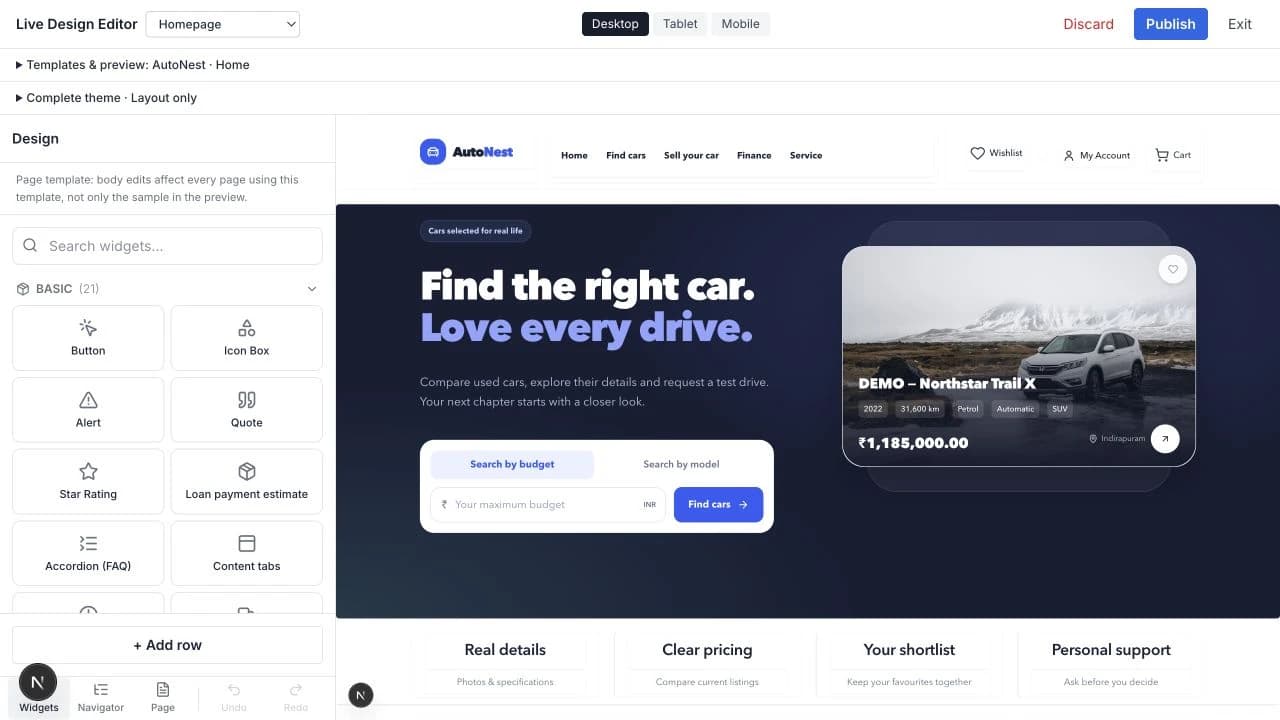
Start with a theme, then make considered changes to its look and layout. Work on the page you’re designing, check different screen sizes, and publish when you’re ready.
Beyond the homepage
Give each page a purpose. Work with page templates and individual blocks, while your products and categories stay connected to the catalog.

Arrange homepage sections, featured collections and banners around the products you want people to discover.
Keep the product list in main content and filters in their own block. Adjust the surrounding layout without disconnecting the catalog.
Shape the product-page layout around its main content, supporting information and the available merchandising blocks.
Use shared headers and footers for a coherent storefront. Review every page using a shared area before you publish.
Control where it matters
Your theme provides a starting point. The editor gives you distinct controls for the brand, the page structure and the content inside it.
Adjust colors, typography, backgrounds and spacing with the available design controls. Carry a consistent visual identity through your storefront.
Organize rows, columns and content blocks within page layouts. Edit a section’s content or adjust its presentation without combining the whole page into one block.
Product listings belong to the page’s main content. Filters have their own block, so you can position and style them separately while keeping the catalog connected.
Work with shared headers and footers alongside page-specific content. Check the other pages that use a shared area before publishing its changes.
From an idea to your storefront
Make changes in a draft, review the result and choose when it becomes the published design.
Change the layout, styling and block content in the editor. Use undo and redo to revisit supported edits as you work.
Preview desktop, tablet and mobile sizes. Check product pages, navigation and shared areas—not just the homepage.
Publish the reviewed draft to your storefront. A saved draft is a workspace for changes, not a signal to put them live.
Before you start
You can work with the available color, typography, spacing and background controls, edit block content, and arrange rows, columns and blocks. Page templates and shared headers and footers have their own role in the layout. The exact options depend on the theme, block and enabled add-ons.
Yes. Product listings are part of the page’s main content, while product filters use a separate block. This lets you arrange the catalog layout without bundling filters, products and other page content into one indivisible section.
Theme-editor drafts let you prepare and preview design changes before publishing them. Review the affected pages and screen sizes, then publish when you are ready. Editing catalog or other store data outside the design draft follows those features’ own save behavior.
Routine changes supported by the editor can be made through its visual controls. A new block type, a custom integration or behavior beyond those controls may still need development. The editor makes everyday design work more accessible; it does not replace every kind of custom development.
Start with a foundation
Explore the available themes or create your store and start shaping its storefront.