
Deliver with your own riders.
Door to door, on record.
Your delivery staff get a simple Android app. You get one board to run them from: send orders out, check each delivery with a code or a photo, and count the cash that comes back.
For Android phones. The rider app is not in the app stores: riders install it from the link in their store's invite, and it offers each new version itself.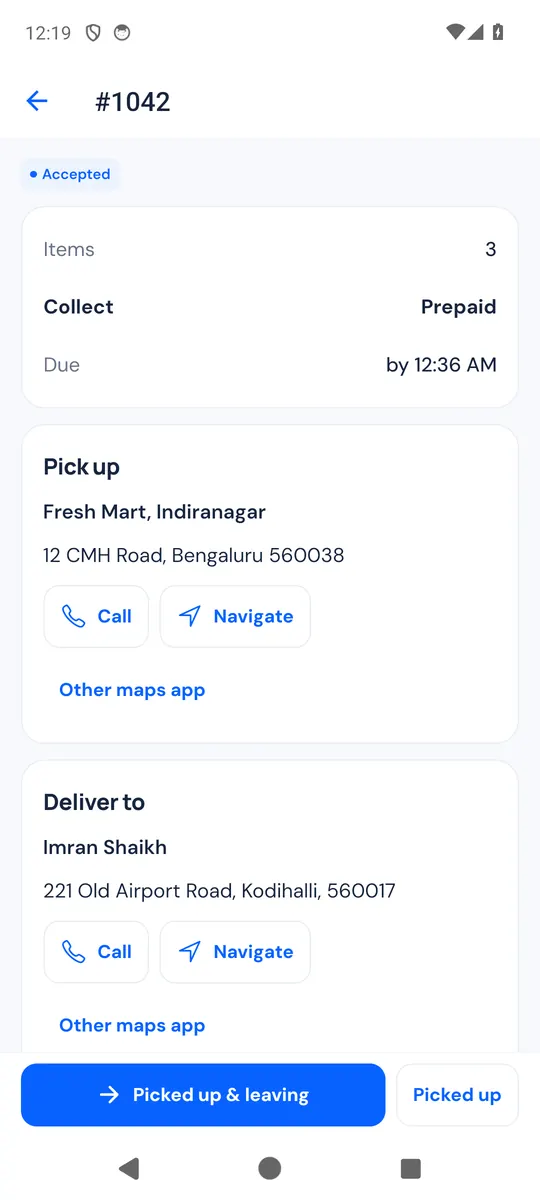
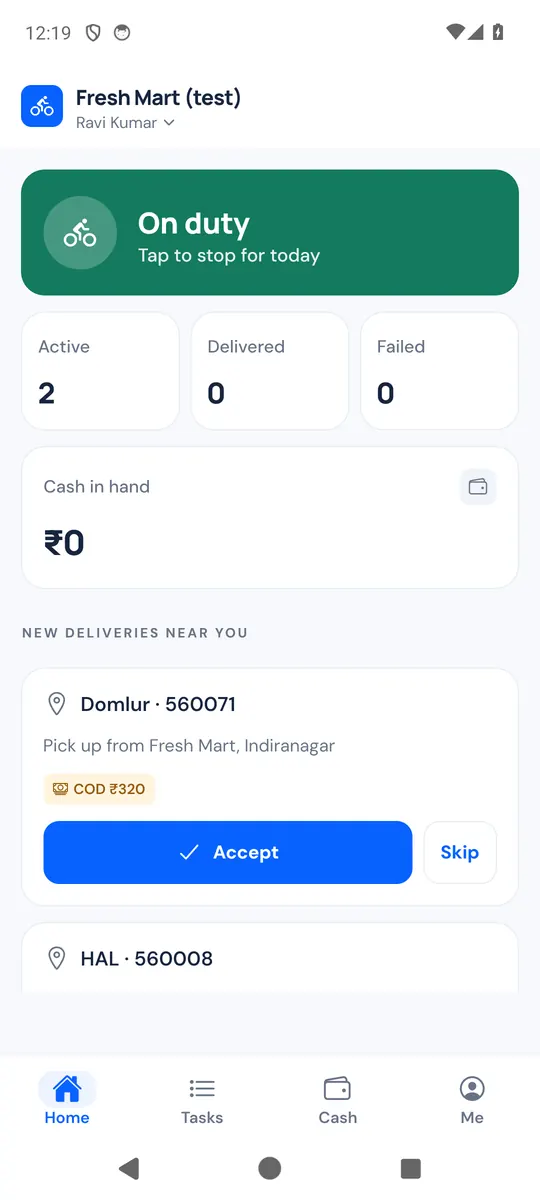
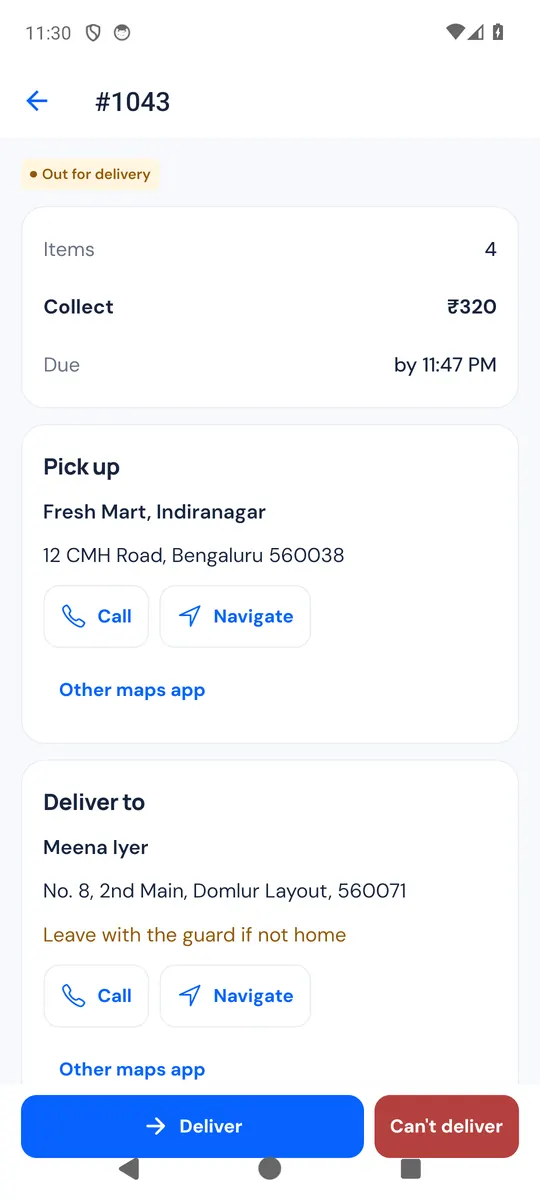
Screens from the app, with an example store and example orders. The delivery card is drawn for this page.
For stores that deliver
with their own people.
If your orders go out with your own delivery staff rather than a courier, this is the app for them. It works for one shop or for several outlets.
Your own staff
Add the people on your payroll who deliver for you, with a cash limit for each if you want one.
Freelance riders
Mark a rider as a freelancer. They use the same app and follow the same proof and cash rules.
One shop or many outlets
With Hyperlocal Delivery, riders get zones, and an order offered to riders only reaches those whose zones cover the address.
Riders next to your courier
Send nearby orders to your riders and ship the rest with your courier. An order booked with a courier stays with the courier.
From your shelf
to the customer's door.
- Store
Add your riders
Add each rider's name and phone in Delivery → Riders. They install the app and scan the invite QR code to join.
- Store
Send an order out
Dispatch it from the delivery board or the order page. Pick a rider yourself, or offer it to riders on duty nearby: the first to accept gets it.
- Rider
Pick up and go
The rider sees the items and the cash to collect, then calls or opens maps from the task. As they leave, the customer gets a delivery code and a tracking link.
- Rider and customer
Hand it over
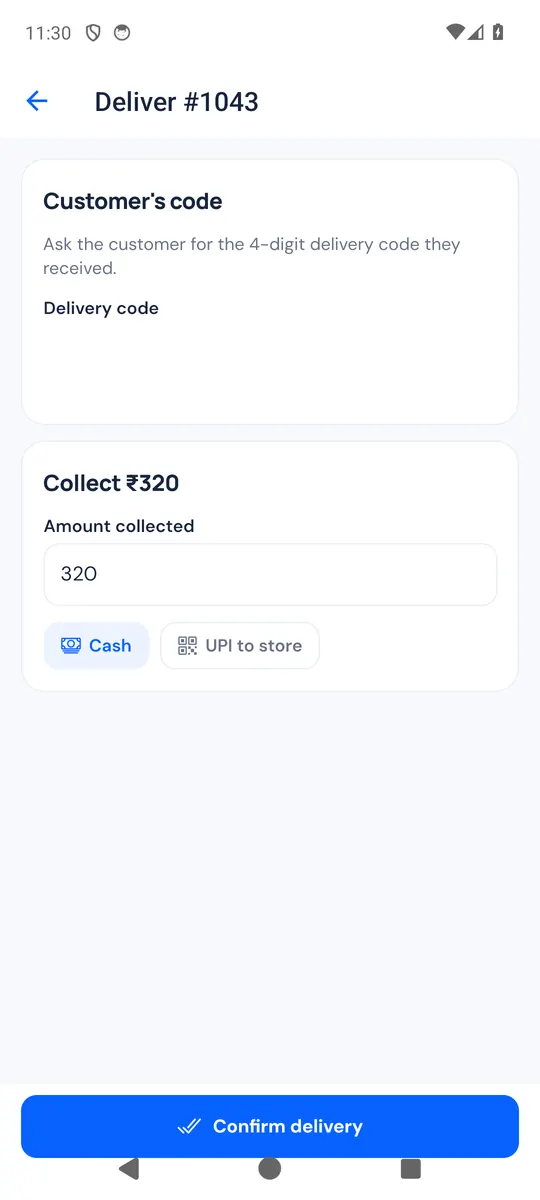
At the door the rider types the customer's code, takes a photo if you ask for one and enters the cash collected. If they can't deliver, they pick a reason.
- Store
Settle the cash
The rider asks to hand over their cash. You count it and confirm it, on the web admin or in the CartWhizz Admin app.
Once the code matches, the order is marked delivered by itself, and marked paid when the full amount was collected in cash.
One board for
every delivery today.
Delivery in your admin shows today's orders in columns, from unassigned to done. It updates by itself as riders move each order along.
- Assign a rider, or offer the order to riders on duty in the area. The first one to accept gets it.
- See time running out: a card turns amber at 75% of the delivery time and red when it is late.
- Reattempt, bring the parcel back, send the customer a new code or cancel, from the same card.
- Send orders out by hand, or let orders on your own-riders shipping method go out by themselves once they are confirmed or packed.
- Give a rider a cash limit: at the limit, they get no new cash orders until they hand cash in.
A simple app
for the person on the bike.
Riders see what they need for the job in hand, and nothing more. Big buttons, plain words, English or Hindi.
- Join by scanning the store's invite QR code, and sign in later with their phone number and a code.
- Go on duty to get offers nearby. An offer shows the area, the pickup point and the cash to collect, but no customer details until the rider accepts.
- Each task has Call and Navigate buttons for the pickup and the customer, and can open any maps app on the phone.
- At pickup, an optional scan of the packing slip checks that the rider has the right parcel.
- Tasks, cash in hand and the last 30 days of history are one tap away. One phone can deliver for more than one store.
You decide
what counts as delivered.
The rider can't finish a delivery without the proof you ask for.
- Delivery code: the customer gets a 4-digit code when the order leaves, for cash orders only or for every order. After 5 wrong tries the code locks and the rider calls you.
- Photo: never, when there is no code, only for failed deliveries, or always. Photos stay private to your store.
- Can't deliver: the rider picks a reason, such as customer not available or wrong address, and you choose to try again or bring the parcel back.
- No signal: if you allow it, the rider can deliver with a photo and their location instead of the code, and the delivery is flagged for you to review.
Know who holds
your cash.
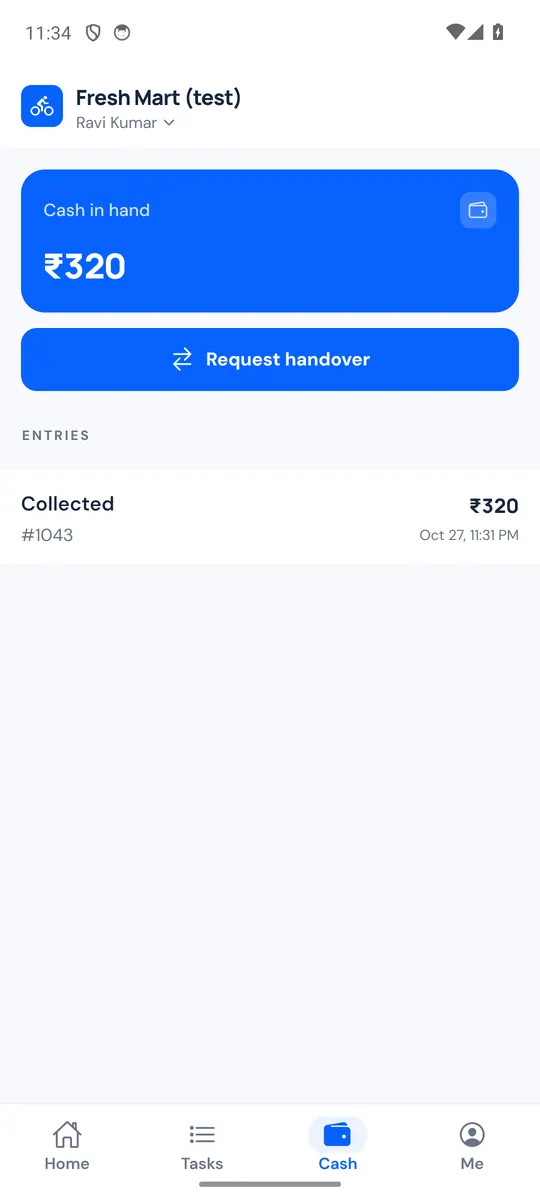
Cash a rider collects goes into a ledger, and comes off only when you confirm you received it.
- The rider enters the amount collected and whether it was cash or UPI to your account. A different amount needs a reason.
- Riders see their cash in hand and tap Request handover when they are back at the store.
- You count it and confirm the amount received, or reject the request. A short or extra amount needs a note.
- Correct a balance with an adjustment that keeps its reason, and export the ledger as a CSV file for your accountant.
- Rider assigned
- Picked up from the store
- Out for delivery
- Delivered
Ravi is delivering your order by scooter
Expected by 6:30 pm
Share this code with the rider only when your order is in your hands.
Customers know
when to open the door.
When the rider sets off, the customer gets their delivery code and a tracking link by SMS, WhatsApp, email or your shopping app, depending on the channels your store has set up.
- The tracking page shows the delivery's progress, the rider's first name and vehicle, and the expected time. It refreshes by itself.
- Signed-in customers also see their delivery code on their order page.
- Customers never see the rider's phone number, and the tracking link stops working a day after delivery.
- If a delivery fails, the customer is told that the store will contact them to arrange another attempt.
Made for real streets
and busy counters.
Keeps working offline
Status updates are saved on the phone and sent in order when the signal returns. The app shows how many are still waiting.
English and Hindi
Each rider chooses the app's language, and you can set it for them when you add them.
Assign from your phone
In the CartWhizz Admin app, open an order and tap Assign rider, see who is on duty and confirm cash handovers.
See the Admin appNotifications
Riders are notified of new and assigned deliveries. Your staff are told when a delivery fails or a rider asks to hand in cash.
One phone, several stores
A rider can join more than one store and switch between them. Each store's tasks and cash stay separate.
Simple updates
When a newer version is out, the rider's home screen offers the download.
Fair to riders,
careful with customers.
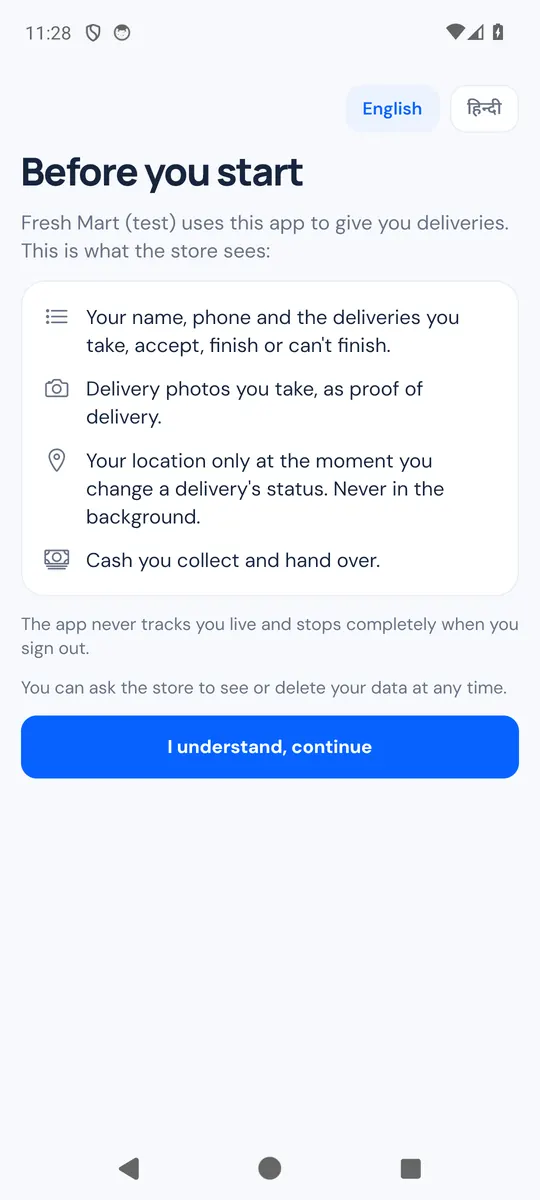
Before a rider starts, the app shows them exactly what the store will see.
- Location only at status changesThe app reads the rider's location when they change a delivery's status, never in the background, and stops completely when they sign out.
- Customer details only while deliveringA rider sees the customer's address and phone after accepting, and no longer once the delivery is finished. History never shows them.
- Calls through the storeChoose whether riders call the customer directly or call your store, which connects them.
- The code is the customer'sThe delivery code goes only to the order's own contact, never to the rider.
Before you
hand out the app.
What does it cost?
It is included in every CartWhizz plan. Switch on Delivery Riders in your store's modules, add your riders and send them their invites.
Which phones does the rider app run on?
Android phones. The app is not in the app stores: riders install it from the link in their store's invite, and the app offers each new version itself with an update prompt.
Can customers watch the rider on a map?
No. The tracking page shows the delivery's status, the rider's first name and the expected time. The app reads the rider's location only when they change a delivery's status, never live.
Can I use my riders and a courier together?
Yes. Send nearby orders to your riders and ship the rest with your courier. An order already booked with a courier can't also go to a rider.
What if the rider has no signal?
The app keeps working and sends updates when the signal is back. The delivery code can only be checked online; if you allow it, the rider can deliver with a photo instead, and you review that delivery.
Does it pay riders or work out their earnings?
No. It records deliveries and the cash riders collect and hand in. Pay your riders the way you do today.
Bring every delivery
into one place.
Tell us how you deliver today, or read the guide to see each step for your team and your riders.