New in CartWhizz

Sell on WhatsApp,
from your own number.

Customers message your WhatsApp Business number to browse your catalog, fill a cart and check on their orders. Your team picks up any chat from one shared inbox, and checkout happens on your own CartWhizz store.

Works with a WhatsApp Business number on Meta’s WhatsApp Cloud API. Off until you switch it on. Read the merchant guide

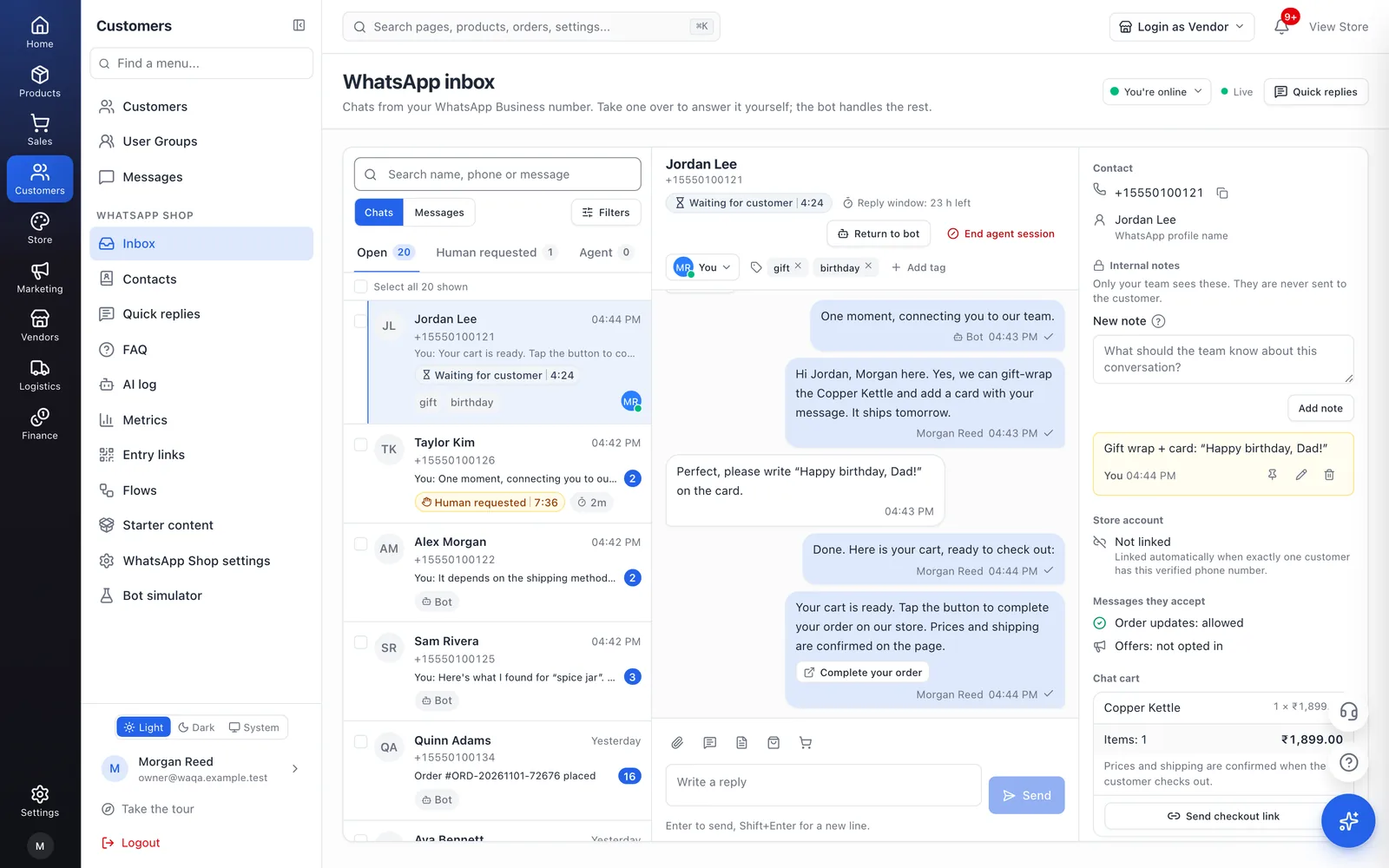
The WhatsApp Shop inbox in a CartWhizz store's admin: a conversation the team took over, with the customer's details, chat cart and notes beside it.
  1. hi
  2. Hi! Welcome to Harbor Goods. What would you like to do?

    Need a person? Type “Talk to us” any time.

    BrowseSearchMy orders
  3. Browse
  4. Stoneware mugs, set of 2

    ₹1,290 In stock

    Add to cartBack
  5. Yes, these mugs are dishwasher and microwave safe.
  6. Add to cart
  7. Added 1 × Stoneware mugs, set of 2 to your cart.

    View cartCheckoutKeep shopping
  8. Checkout
  9. Your cart is ready. Tap the button to complete your order on our store. Prices and shipping are confirmed on the page.

    Complete your order
A shortened illustration on a demo store. The voice note is written down and answered by CartWhizz AI from the product’s details; Complete your order opens the cart on the store’s own website. Behind it, the real inbox.
Why WhatsApp Shop

Your customers already chat. Now that chat can sell.

What changes for any store when its WhatsApp number can show products, take orders and answer on its own, with your team one tap away.

  • Sell where customers already chat

    Customers message your WhatsApp Business number and the bot shows your categories, search and product cards right there.

  • Nothing for shoppers to install

    WhatsApp is enough to browse and fill a cart. The checkout link opens your store in their browser.

  • Answers in seconds, day and night

    The bot replies to every message straight away, FAQs answer on their keywords, and CartWhizz AI takes the questions a menu can’t.

  • A cart and checkout from the chat

    A real cart with your stock and prices; checkout by a secure link to your store, or in the chat for cash on delivery and bank transfer.

  • One inbox for the whole team

    Take a chat over from the bot, assign it, tag it, leave notes and see who is online, live.

  • Bring back carts left in the chat

    Switch on one reminder per chat cart, sent as an approved template and only to customers who opted in to offers.

  • Back-in-stock and price-drop alerts

    Shoppers tap Notify me on a sold-out product and hear once it’s back; linked customers hear when a wishlist item gets cheaper.

  • Links and QR codes that start chats

    Entry links and QR codes for print, shelves and social, plus click-to-WhatsApp ads, each counted on the Metrics page.

  • A number for every marketplace seller

    Each seller can answer on their own WhatsApp number, in their own inbox, with only their own products.

  • Costs you can see, with a cap

    Enter Meta’s rates to see this month’s spend; set a budget, be told at 80% and 100%, and cap the bot’s optional messages.

  • Ready-made starter content

    FAQs, store pages, forms and flows arrive filled in with your store’s details, so you start from a working set, not empty pages.

  • See it on your own store

    Start a CartWhizz store and switch WhatsApp Shop on when your number is connected.

    Start your store

Who it’s for

  • Fashion Sizes and colours as options in the chat, with a photo on every product card.
  • Electronics Spec questions answered by CartWhizz AI from your own product details.
  • Groceries Quick orders, with cash on delivery right in the chat.
  • Local shops A QR code on the counter, opening hours and an after-hours message.
  • Marketplaces A WhatsApp number and an inbox for each seller.
  • B2B and bulk A wholesale flow that collects products, quantities and an email for your team.
Two sides of one chat

What your customer sees, and what your team sees.

The customer has one simple conversation with your store. Your team sees who said what, the customer’s account and cart, and what to do next.

Your customer, in WhatsApp

  1. Added 1 × Copper Kettle to your cart.

    View cartCheckoutKeep shopping
  2. Could you gift-wrap it? It’s a birthday present.
  3. We’re happy to add a gift message: write it in the order notes at checkout, or message us here with your order number. We can also leave the prices out of the parcel. Ask us whether gift wrapping is available for your items.

    BrowseSearchMy orders
  4. Talk to us
  5. One moment, connecting you to our team.
  6. Hi Jordan, Morgan here. Yes, we can gift-wrap the Copper Kettle and add a card with your message. It ships tomorrow.
  7. Perfect, please write “Happy birthday, Dad!” on the card.
  8. Done. Here is your cart, ready to check out:
  9. Your cart is ready. Tap the button to complete your order on our store. Prices and shipping are confirmed on the page.

    Complete your order
  • One conversation with your store, under your name
  • Product cards, a cart and a checkout link without leaving the chat
  • A person when they ask for one, in the same chat

Your team, in the inbox

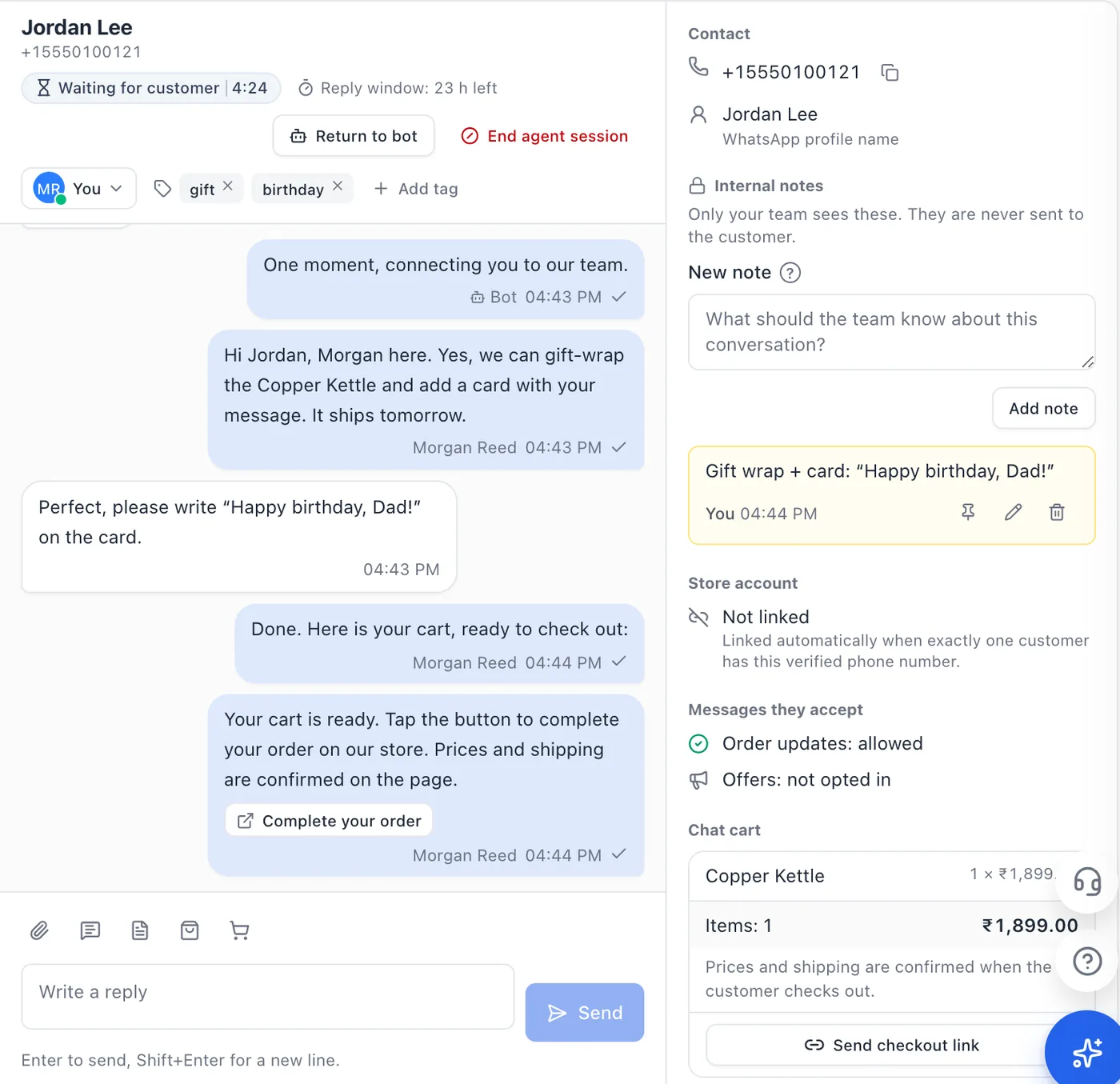
The same conversation in the WhatsApp Shop inbox: the bot’s and Morgan’s messages with their senders, then the customer’s contact, an internal note, consent and chat cart beside it.
  • Every message, with the bot’s and each teammate’s marked
  • The customer’s account, consent and chat cart beside the chat
  • Tags, internal notes, assignment and the reply-window countdown
How it works

Live in four steps.

Your customers need nothing new: they message your number in the WhatsApp they already use.

  1. Connect your WhatsApp number

    Add your WhatsApp Business number’s Cloud API details in Settings → Messaging. The same connection sends your order updates.

  2. Switch WhatsApp Shop on

    Enable it in Settings → Modules. The bot works with sensible defaults, and the bot simulator lets you chat with it before any customer does.

  3. Turn on starter content

    Ready FAQs, policy pages, forms and flows arrive as drafts filled in with your store’s details. Read them, then turn on what fits.

  4. Share your link or QR code

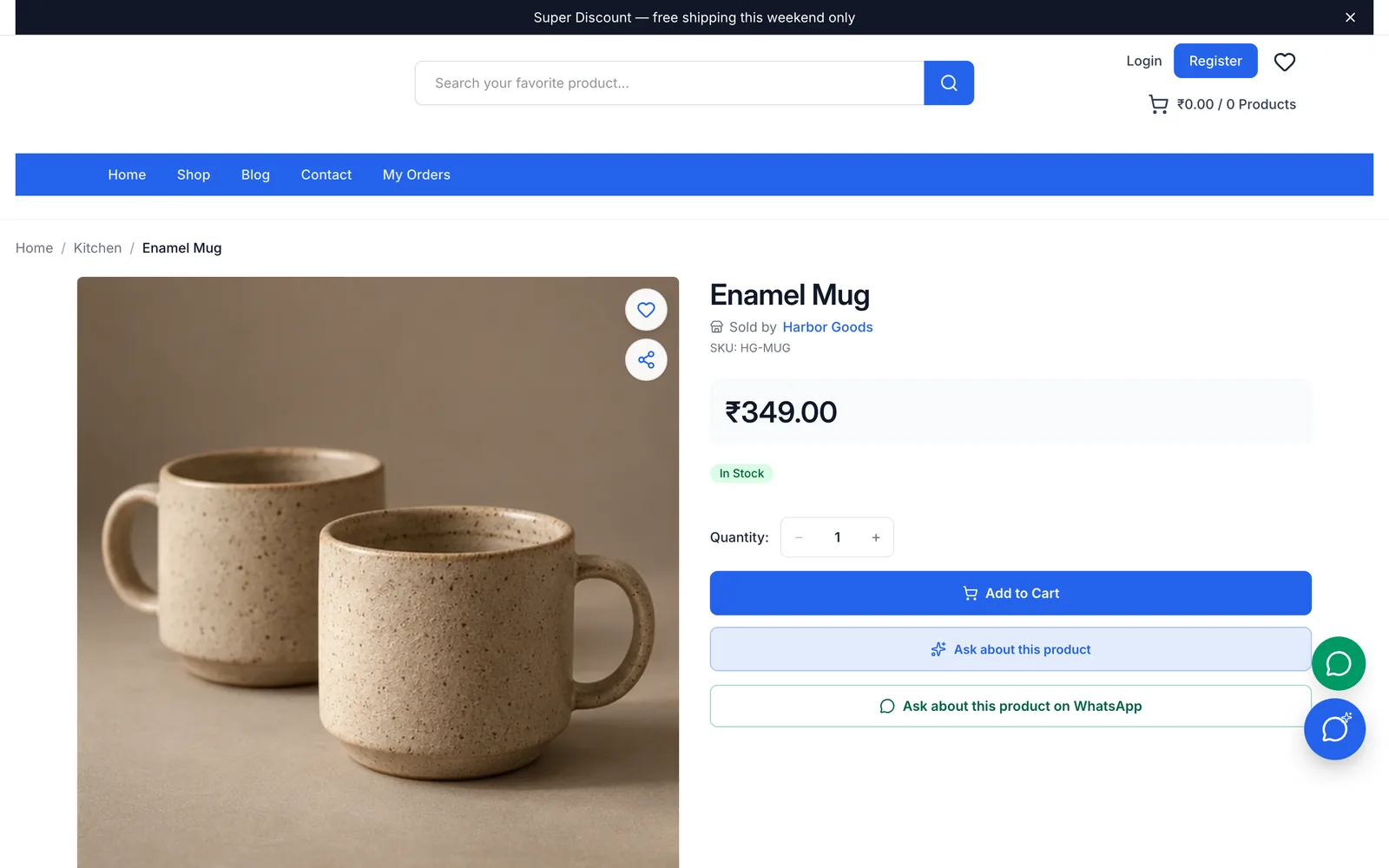
    Show the chat button on your store, print entry links as QR codes, and let product pages offer Ask about this product.

In your admin

Every screen here is WhatsApp Shop as it ships, captured from a demo store with sample products and chats.

The WhatsApp Shop inbox with a list of conversations, an open chat the team took over, and the customer’s details.

The inbox: conversations with their state, the open chat and the customer’s details, cart and notes.

What you get

Everything a chat needs to become an order.

Sell in the chat

A menu bot that knows your catalog, your prices and your cart rules.

  • Categories up to three levels deep, search, and product cards with photo, price and stock
  • A real cart, with the same stock limits, quantity rules and totals as your website
  • A checkout link that opens the chat cart on your store, valid for 72 hours by default
  • Orders placed in the chat for cash on delivery and bank transfer, at the exact total your checkout calculates
  • My orders: recent orders, their status and a tracking button once a shipment exists
From chat to order in five steps: browse, product, cart, checkout, order placed1Browsecategories, search2Productphoto, price, stock3Cartyour cart rules4Checkoutlink or in chat5Orderin your Orders

A team inbox

Everyone works the same number, and the page updates as messages arrive.

  • Take a chat over from the bot, hand it back, or let timers return quiet chats to it
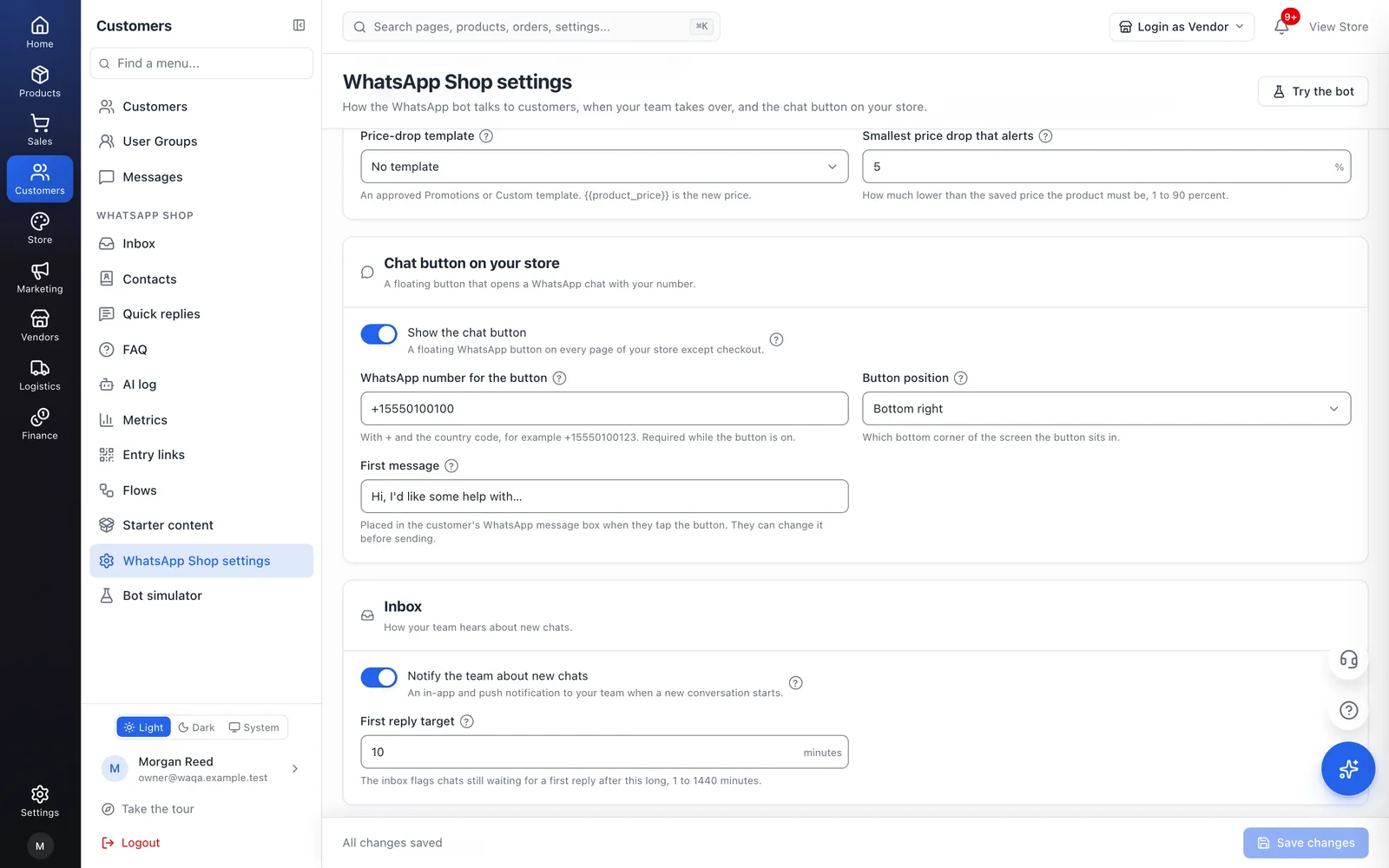
  • Assignment, presence, tags, pinned internal notes and quick replies
  • Photos, videos, audio and documents both ways, plus product cards and the chat’s checkout link
  • A countdown for WhatsApp’s 24-hour reply window, and approved templates once it closes
  • A first-reply badge that turns amber, then red, as a waiting customer nears and passes your target
  • Bulk actions and message search across every conversation
Three conversations in the inbox with their states: Agent, Human requested and BotJJordan LeePerfect, please write…AgentTTaylor KimTalk to usHuman requestedAAlex MorganHow long does delivery…Bot

AI that knows your store

CartWhizz AI answers the questions a menu can’t, and steps aside when it isn’t sure.

  • Answers typed questions from your products, policies, help pages and FAQs
  • Sends an answer only when it passes the checks and your confidence setting; otherwise the bot replies and offers your team
  • Writes down voice notes and handles them like typed messages, STOP included
  • Names the product in a customer’s photo and searches your catalog for it
  • An AI log of every question, its answer and why it was or wasn’t sent
  • Off until you switch it on; usage counts against your store’s CartWhizz AI limits
A voice note, its transcript and the answer CartWhizz AI sentTranscript by CartWhizz AI“Does the kettle work on induction?”Yes, the Copper Kettle works oninduction hobs.Answered by AI

Automations

Flows, forms and alerts, each off until you want it.

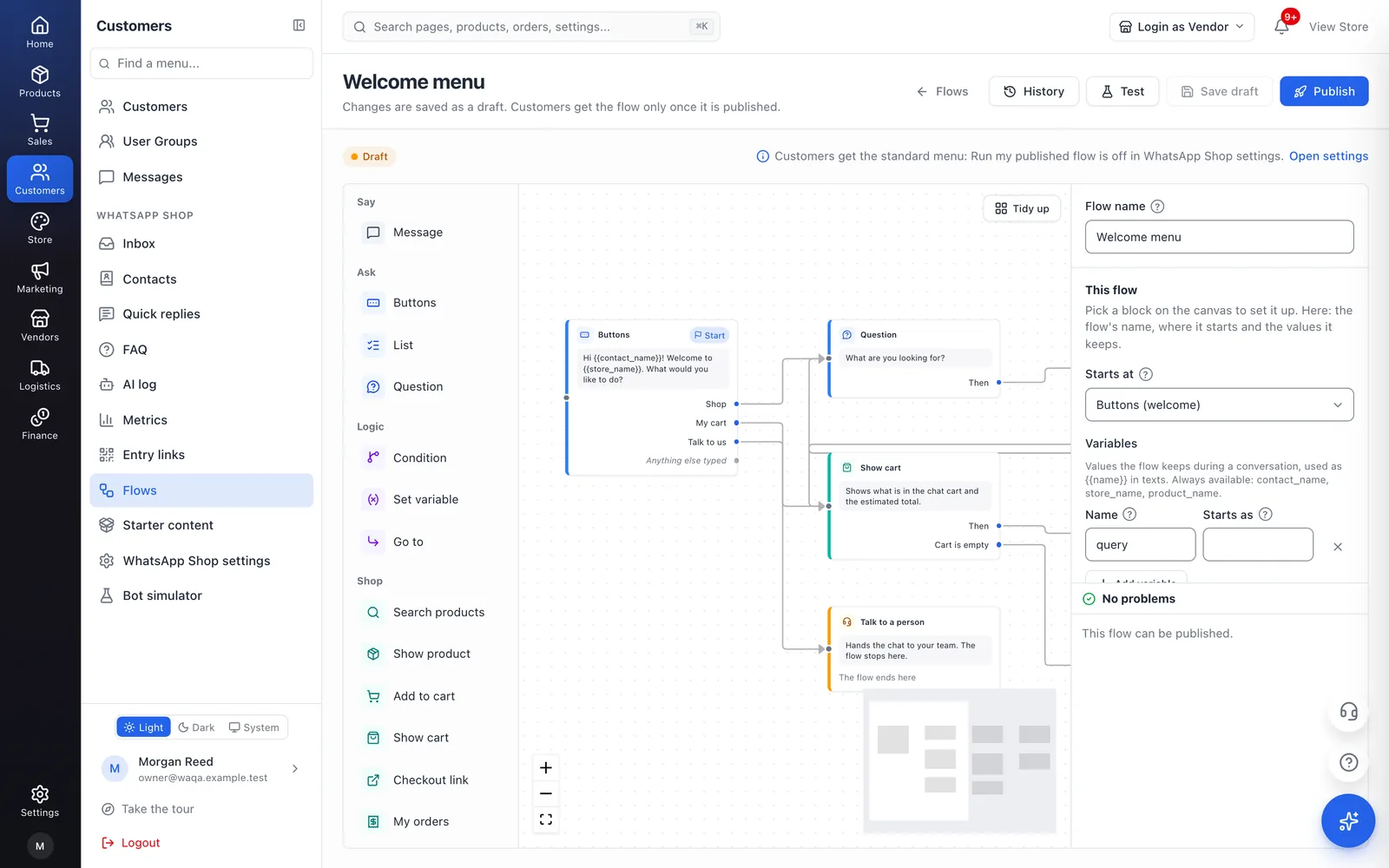
  • A visual flow builder: messages, buttons, lists, questions, conditions and shop actions, checked before you publish
  • Native WhatsApp forms for the delivery address and contact details in the in-chat checkout
  • A WhatsApp FAQ with keywords the bot answers straight away
  • Back-in-stock and price-drop alerts, sent once, as an approved template and only to customers whose consent allows it
  • One reminder for a cart left in the chat, only to customers who opted in to offers
  • Opening hours, with an after-hours message once per chat per day
A back-in-stock alert as the customer receives it on WhatsAppBack in stockGood news: the Copper Kettle you askedabout is back at Harbor Goods.View productSent once, with consent

Grow

Bring more chats in, and see which ones turn into orders.

  • Entry links with their own first message and landing: the menu, a product, a category or your team
  • QR codes as PNG for print and SVG for designers
  • Click-to-WhatsApp ads: the ad behind each chat and the conversations it started
  • Ask about this product on WhatsApp on your product pages, with taps counted per product
  • A chat button on your store, bottom right or bottom left
  • Results by entry point: conversations, checkout links opened, orders and revenue
A printed entry-link card with its QR code, campaign and where the bot opensScan to openShelf QR, kitchen aisleCampaign: spring-flyerThe bot opensA category: KitchenPNGSVG

Control

Costs, consent and data, on your terms.

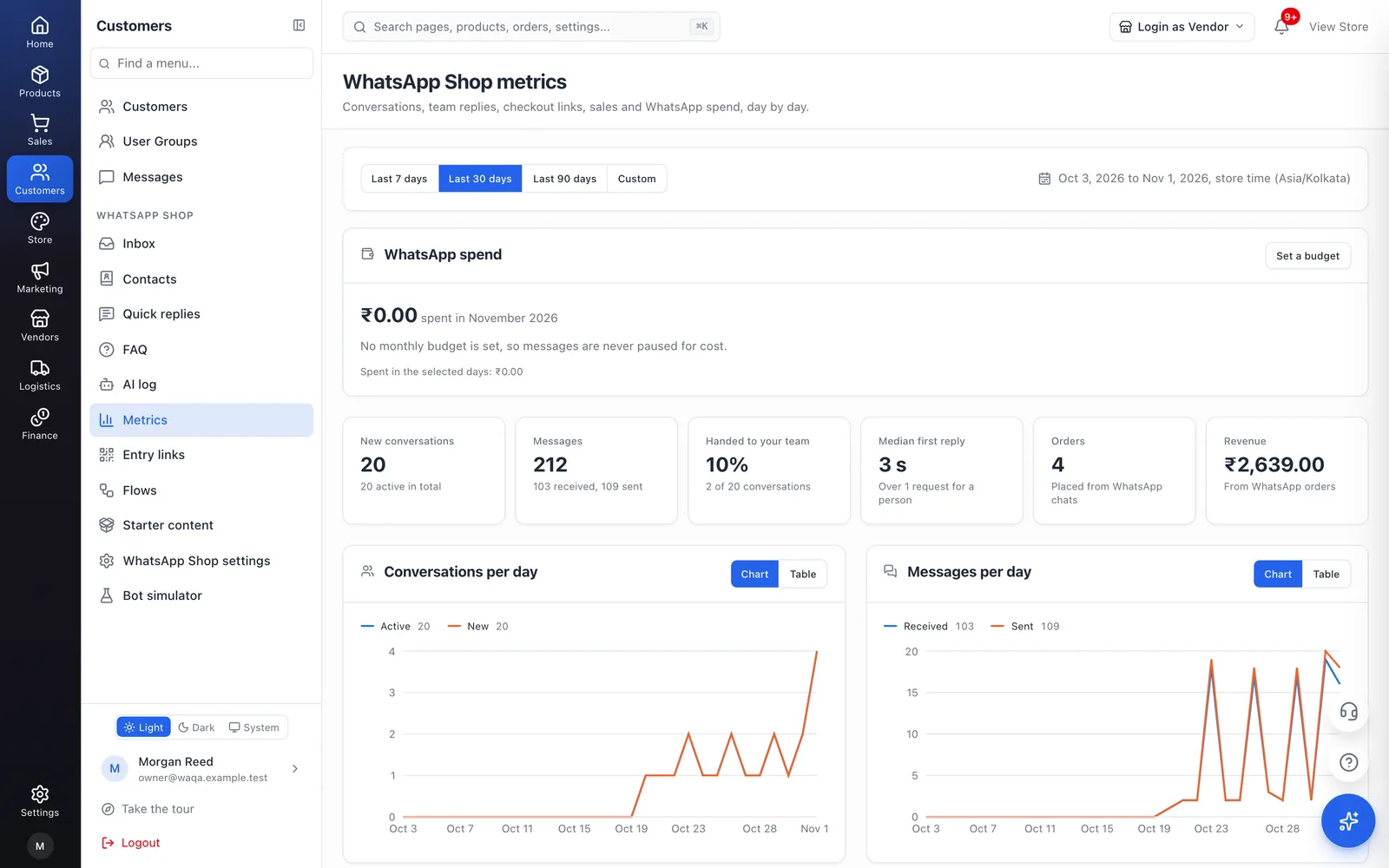
  • Metrics: conversations, messages, hand-overs, median first reply, WhatsApp orders and revenue
  • Message costs from the rates you enter, this month’s spend, and a monthly budget with an optional hard cap
  • STOP and UNSUBSCRIBE handled at once: one confirmation, consent withdrawn
  • Contacts with their consent and a CSV export that never includes message text
  • Hide products or categories from WhatsApp while they stay on sale on your website
  • Chats kept for 180 days by default (30 to 730), then deleted every night
This month’s WhatsApp spend against the budget, with marks at 80% and 100%This month’s WhatsApp spend80%100%At 80%: your team is told once.At 100%: optional bot messages pause, with the cap on.

The QR code in the Grow illustration is real: it opens this page. A store’s own entry links open a chat with that store.

For marketplaces

Every seller can have their own number and inbox.

On a CartWhizz marketplace, a WhatsApp number can belong to a seller. Customers who write to it reach that seller, not the store.

  • The bot on a seller’s number shows only that seller’s products, in their categories and search
  • The seller answers from their own inbox in the vendor panel, with the same tools as yours, and sees only their own chats
  • Your inbox shows every conversation with the seller’s name, and filters by number
  • A seller can submit their own number; it waits for you to verify it
See the marketplace
On a marketplace: the store’s number and each seller’s number lead to their own inboxes; the store’s inbox also lists sellers’ chatsStore numberthe whole catalogStore inboxSeller A numberSeller A productsSeller A inboxSeller B numberSeller B productsSeller B inboxlists them too
Starter content

Start with answers that are already written.

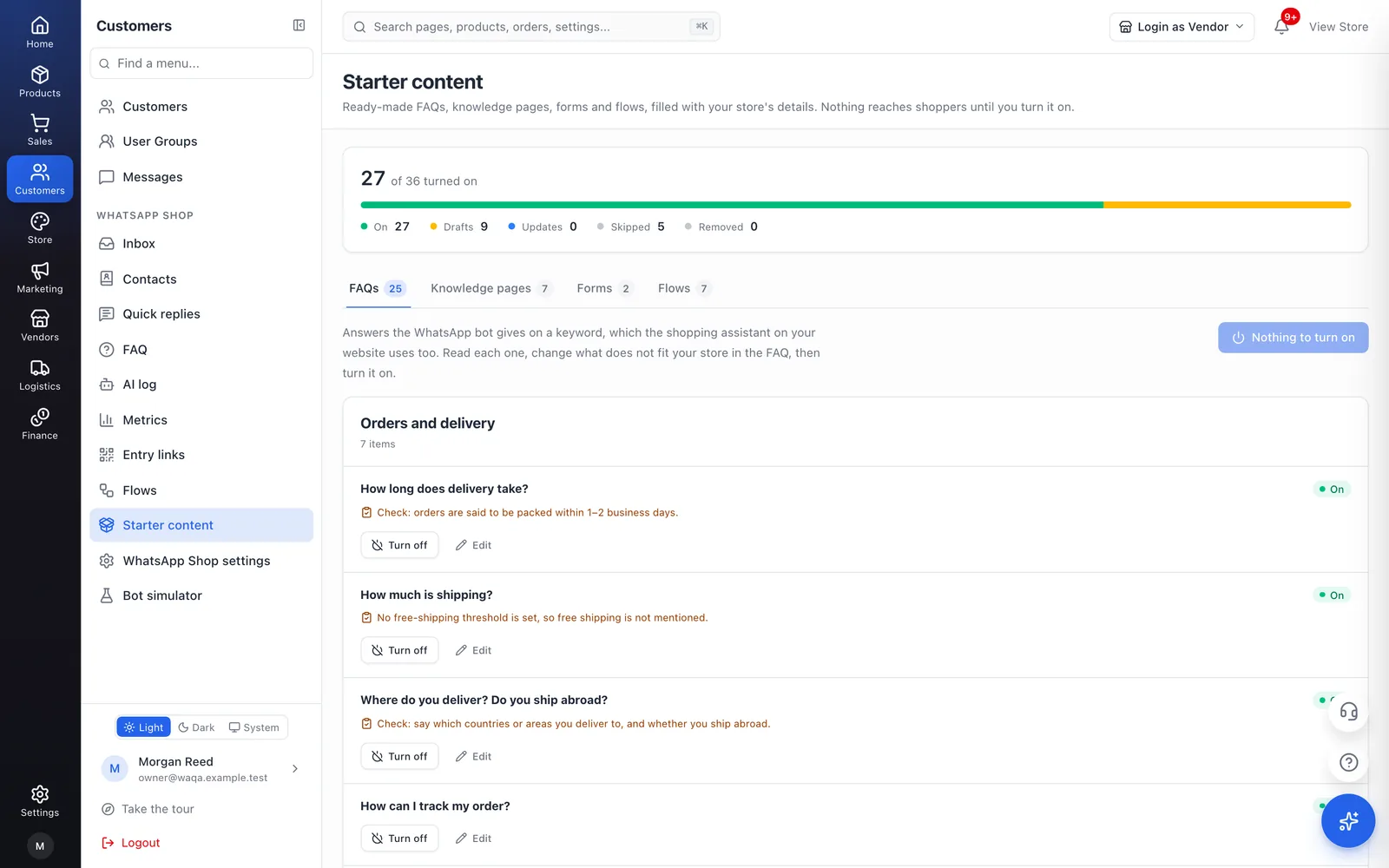
Switch WhatsApp Shop on and a starter set is copied into your store as drafts, filled in with your store’s name, contact details, shipping methods and rates, payment methods and opening hours. Nothing answers a customer until you turn it on.

  • 25 FAQs

    Delivery, payments, returns, products and contact, each with WhatsApp keywords. A store without cash on delivery gets 24.

  • 7 store pages

    Shipping, returns, payment, contact, about, privacy and terms, added only where your store has no page of its own.

  • 2 forms

    The delivery address and contact details forms for ordering in the chat.

  • 7 chat flows

    Opening hours, order tracking, returns, delivery area, call-back, wholesale and feedback, each started by its keyword.

Where a fact can’t come from your store, such as a return window, the draft uses a common default and asks you to check it. Forms and flows need the Flows part of your plan. An item you edit stays yours when the library improves.

Compared

WhatsApp Shop, or the WhatsApp Business app on its own?

The WhatsApp Business app is a good start when one person answers chats. WhatsApp Shop connects the chat to your store, your orders and your team.

WhatsApp Shop, or the WhatsApp Business app on its own?
FeatureWhatsApp ShopThe WhatsApp Business app on its own
Products in the chatYour CartWhizz catalog, prices and stock, always in stepA catalog you add and update in the app by hand
CartA real store cart with your stock limits and quantity rulesCustomers can send you a cart of catalog items as a message
Checkout and paymentA link to your store’s checkout, or in-chat orders for cash on delivery and bank transfer, recorded in your OrdersYou arrange payment and record the order yourself
Order statusCustomers check their orders and tracking in the chatYou look orders up and reply by hand
Answers when you’re busyA menu bot, FAQ answers and CartWhizz AI, with a hand-over to your teamGreeting and away messages, and quick replies
TeamA shared inbox with assignment, presence, tags, notes, a first-reply target and permissionsThe app on your phone and linked devices, with labels
Messages you startApproved templates, one cart reminder and stock alerts, all consent-checked; no broadcastsBroadcast lists to contacts who saved your number
ResultsConversations, reply times, checkout links, WhatsApp orders and revenue, by entry pointNo link to your store’s orders or revenue
Marketplace sellersEach seller’s own number and inboxNot built for several sellers
Where you replyThe inbox in your CartWhizz admin, in any browser, phone includedThe WhatsApp Business app on your phone
CostYour CartWhizz plan, plus Meta’s per-message charges on the WhatsApp Cloud APIThe app is free to use

The WhatsApp Business app is Meta’s own app; its features are described in general terms as of November 2026 and may change.

Pricing

Part of your CartWhizz plan.

WhatsApp Shop comes in parts, and your plan decides which you get. Every part is included in every plan.

Part of your CartWhizz plan.
PartStarterGrowthProEnterprise
WhatsApp ShopThe shopping bot, the team inbox, checkout links, the chat button on your store, the bot simulator and metrics.IncludedIncludedIncludedIncluded
WhatsApp Shop: AI answersCartWhizz AI answers customers’ questions in the chat and reads their voice notes and photos.IncludedIncludedIncludedIncluded
WhatsApp Shop: FlowsThe visual flow builder and native WhatsApp forms.IncludedIncludedIncludedIncluded
WhatsApp Shop: Growth & marketingEntry links and QR codes, the WhatsApp FAQ, Ask about this product, stock and price alerts, and cart reminders.IncludedIncludedIncludedIncluded
WhatsApp Shop: Seller inboxesFor marketplaces: each seller answers customers on their own WhatsApp number, in their own inbox.IncludedIncludedIncludedIncluded

WhatsApp’s own message charges

Meta charges your own Meta account for WhatsApp messages: per delivered message, priced by the message’s category and your customer’s country. Messages that fail are not charged. Your invoice from Meta is what you pay; enter Meta’s rates in WhatsApp Shop and it tracks this month’s spend against a budget you set.

AI usage

AI answers, voice notes and photos count against your store’s CartWhizz AI limits, the same as your website’s chat.

Compare plans
Questions

Before you switch it on.

Read the merchant guide
What do I need to get started?

A CartWhizz store and a WhatsApp Business number on Meta’s WhatsApp Cloud API, in your own Meta Business account. You connect the number once in Settings → Messaging, with WhatsApp Notifications switched on, and WhatsApp Shop uses the same connection. Gupshup and Twilio can keep sending your order updates, but the bot and the inbox need Meta’s Cloud API.

Can customers pay inside WhatsApp?

Cards and other online payments happen on your store’s own checkout page: the chat sends a secure link that opens the customer’s cart there, valid for 72 hours by default. With Take orders in the chat switched on, customers paying by cash on delivery or bank transfer can place the order without leaving WhatsApp. No card details pass through the chat.

What does WhatsApp charge for messages?

Meta charges your own Meta account per delivered message, priced by the message’s category and your customer’s country; messages that fail are not charged. Your invoice from Meta is what you pay. Enter Meta’s rates and WhatsApp Shop shows this month’s spend. Set a monthly budget to be told at 80% and 100%, and, if you like, have the bot stop its optional messages once the budget is used.

Can I try it before customers see it?

Yes. WhatsApp Shop is off until you switch it on, and the bot simulator lets you chat with your bot the way a customer would. Nothing is sent to WhatsApp, and simulator chats never appear in your inbox or metrics.

Will the AI make up prices or stock?

CartWhizz AI answers only the typed questions the bot does not understand, from your own products, policies, help pages and FAQs. An answer is sent only when it passes checks against your store’s data and meets your confidence setting; otherwise the customer gets the bot’s usual reply and a button to reach your team. AI answers are off until you switch them on.

What happens when a customer sends STOP?

STOP or UNSUBSCRIBE (you can change the words) withdraws the customer’s WhatsApp consent for order updates and offers, and they get one confirmation, never a second. They can still write to you, and your bot and team answer in the chat they started.

Does WhatsApp Shop send broadcast messages?

No. WhatsApp Shop answers the chats your customers start. Beyond those replies it sends only one reminder for a cart left in the chat and back-in-stock or price-drop alerts; each is off until you switch it on, goes out as an approved WhatsApp template and checks the customer’s consent first. Your team can also send an approved template to one customer from the inbox.

Can my whole team answer from one number?

Yes. Every chat lands in one shared inbox that updates live. Assign chats, see who is online, tag chats, leave internal notes and use quick replies. Team members with View WhatsApp Shop can read every chat; Manage WhatsApp Shop is needed to reply. You can also add more numbers from the same WhatsApp Business Account.

Does it work for a marketplace?

Yes. A WhatsApp number can belong to a seller: the bot on it shows only that seller’s products, and the seller answers from their own inbox in the vendor panel, seeing only their own chats. Your store’s inbox shows every conversation with the seller’s name.

Is WhatsApp Shop included in my plan?

WhatsApp Shop comes in parts: the shop itself, AI answers, Flows, Growth & marketing and Seller inboxes. Your plan decides which you get; the pricing table on this page and Billing → Apps in your admin show what yours includes. Meta’s message charges are separate and billed to you by Meta.

Open the chat your customers already use.

Start a CartWhizz store, connect your WhatsApp Business number and switch WhatsApp Shop on when you are ready.

WhatsApp is a trademark of Meta Platforms, Inc. WhatsApp Shop works through your own Meta Business account and WhatsApp Business number: the number, its conversations and what Meta charges for them belong to your Meta account. The conversation at the top of this page is an illustration.