Grow your online store on WhatsApp: how customers shop and how your team helps
A shopping trip in a chat, from hello to paid order, and how your team shares one WhatsApp inbox, so more chats become sales and more customers come back.
Your customers already open WhatsApp dozens of times a day. They chat with family, share photos, and plan their weekends there. So when someone wants to ask whether that kurta comes in blue, or whether your cake can reach them by Saturday, the easiest thing in the world is to message you.
WhatsApp Shop turns that message into a sale. Your store becomes something customers can browse, ask about and buy from, right inside the chat they already use, with your team one tap away when a person is needed. This post skips the setup details. It is about what the experience feels like for your customers, how your team works together behind the scenes, and why it brings more orders to your online store.
A shopping trip in a chat
Meet Maya. She saw your store's post and tapped the WhatsApp button on your website. Here is what happens next.
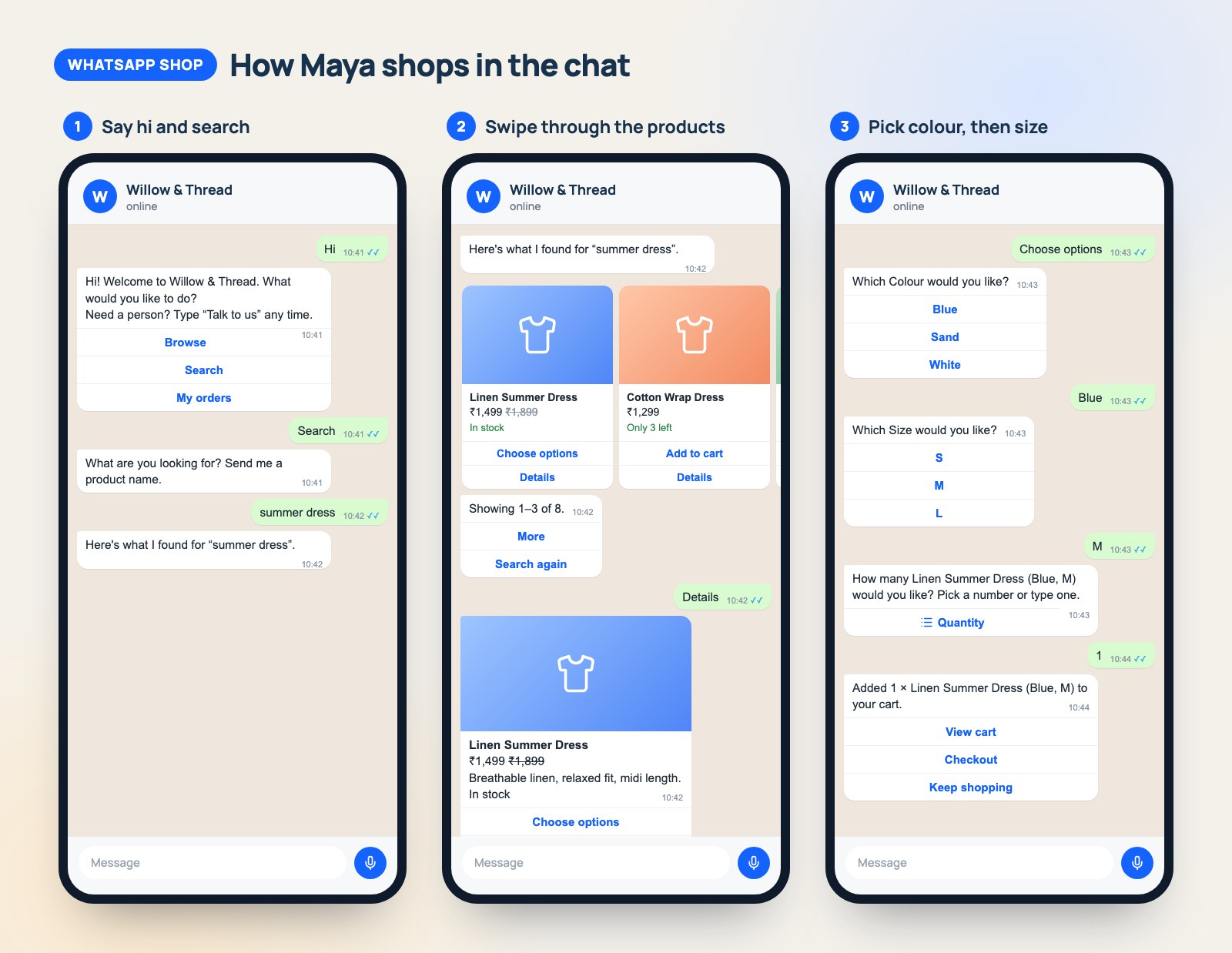
She says hi, and your shop answers in seconds. A friendly welcome arrives straight away with three simple choices: browse, search, or check an order. No app to download, no account to create, no waiting for someone to come online.
She looks around the way she would in a shop window. Maya types "summer dress". Your products arrive as picture cards she can swipe through, each with its photo, price and whether it is in stock. With AI search help switched on, a slightly different phrase such as "sun dress" or "dresses for summer" still finds the closest matches instead of a dead end.
Choosing a size is easy. She taps the dress she likes. The bot asks which colour, then which size, and only offers what you actually have in stock. She never picks a combination that turns out to be sold out.
Her cart is always one tap away. She adds two items, checks the total, and applies the coupon code from your Instagram story. She can also ask to see your current offers and pick one that suits her.
She checks out without leaving the chat. Maya confirms her address, picks a delivery option and chooses how to pay. A clear summary shows everything: items, delivery, discount and total. She taps Confirm order.
- If she chose cash on delivery or a bank transfer, she gets her order confirmation right there in the chat, with your payment instructions.
- If she chose to pay online, she gets a Pay now button that opens your store's own secure payment page. Once she has paid, a message lands in the chat: payment received, your order is confirmed. A Back to WhatsApp button takes her straight back to the conversation.
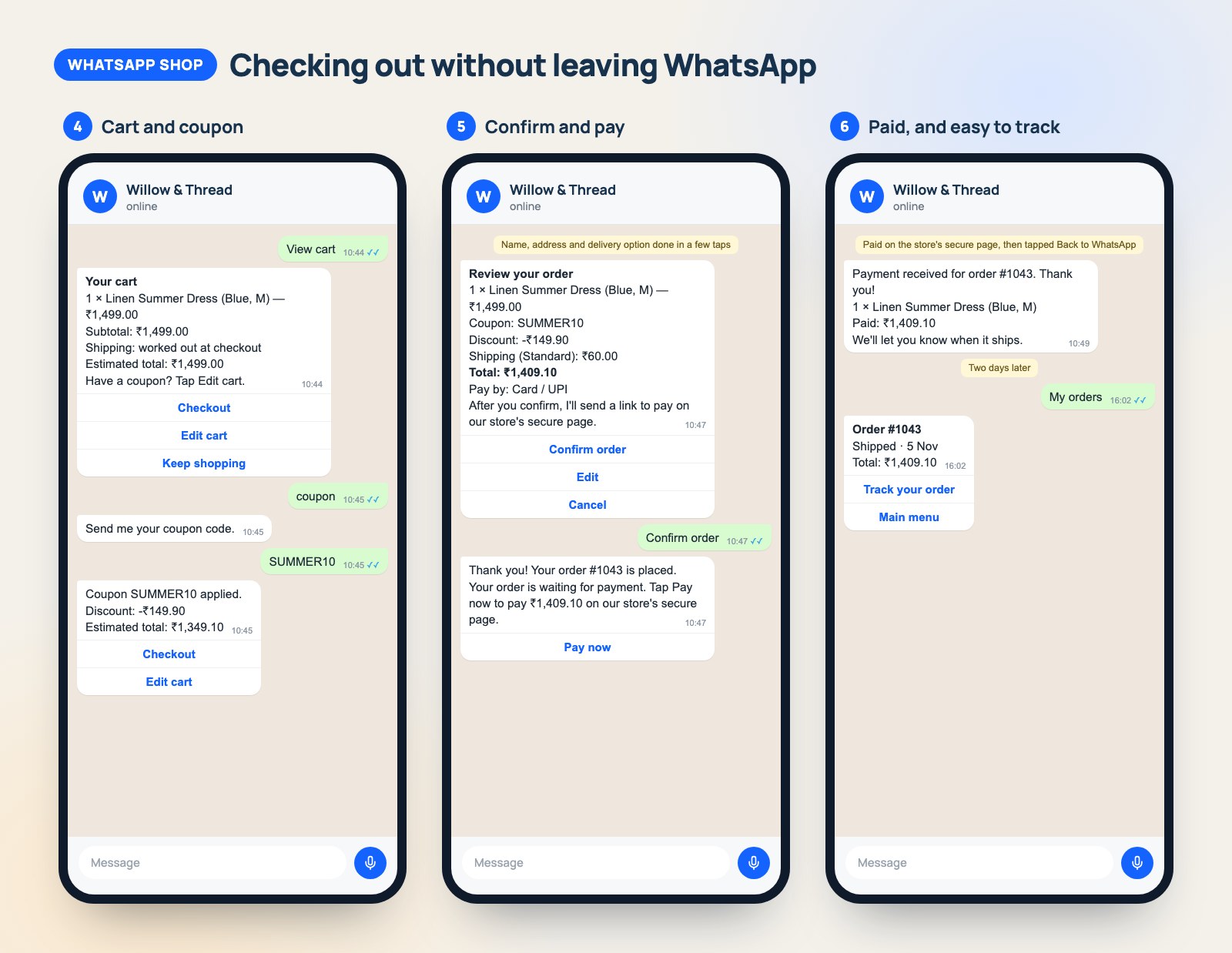
Later, she checks on her order in the same chat. Two days on, Maya taps My orders and sees its status, with a tracking link once it has shipped. No hunting through emails, no "where is my order?" phone call.
From Maya's side, it felt like texting a helpful shop assistant who never sleeps. That is the point.
Behind the counter: your team, working together
The bot handles the everyday questions, but some customers want a person. Maybe they need help with a gift, a bulk order or a return. WhatsApp Shop gives your whole team one shared inbox for your WhatsApp number, so nobody has to pass a phone around.
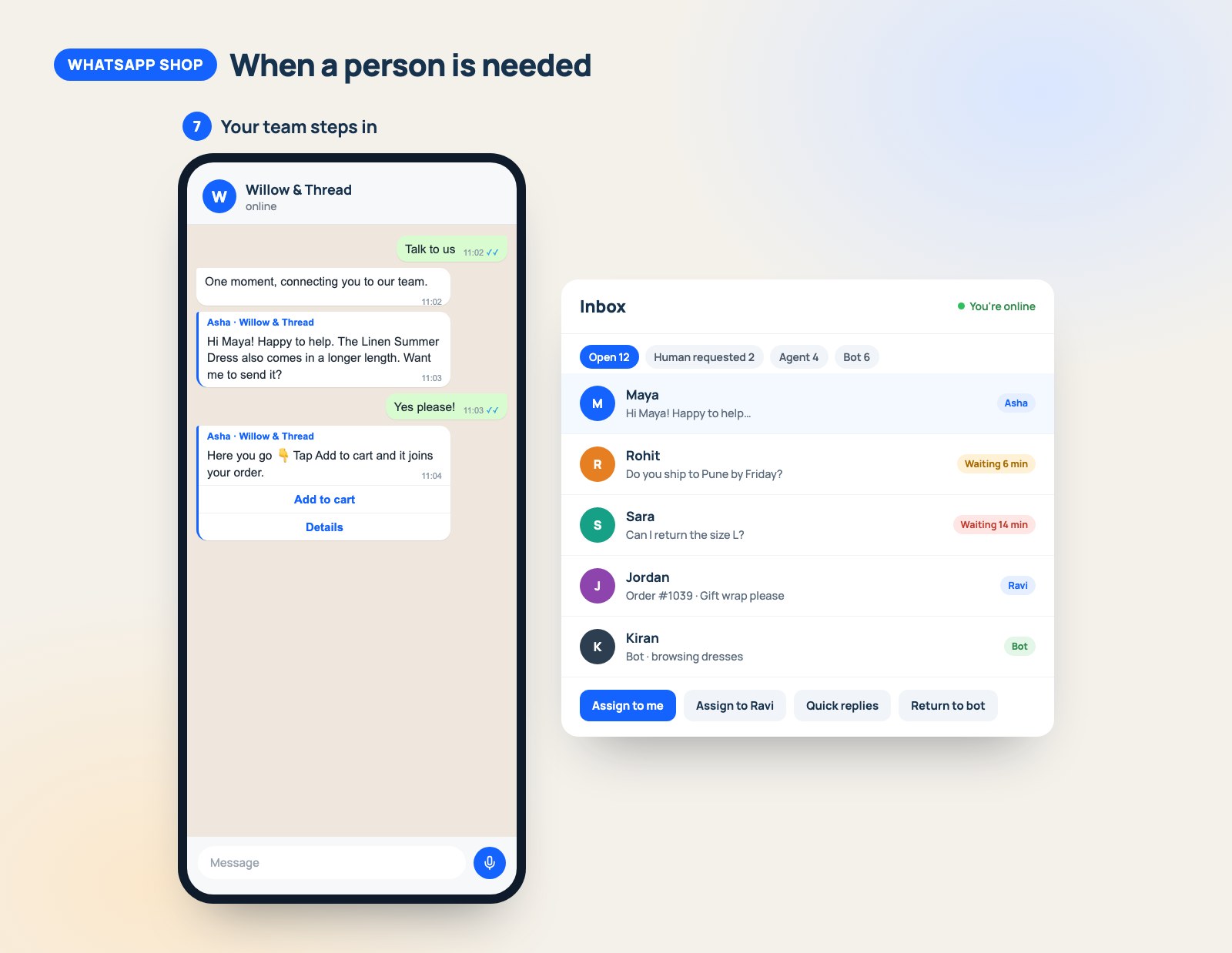
Customers can ask for a human at any time. When a customer types "talk to us", the chat is flagged for your team and the bot steps back. If nobody replies within the time you set, the bot politely steps back in so the customer is never left waiting in silence.
You decide who handles what. Anyone on the team can pick up a chat with Assign to me. Managers can hand a chat to a colleague: a payment question to your accounts person, a custom order to the owner, a delivery question to whoever handles dispatch. Everyone can see who is handling each chat, so two people never reply to the same customer.
Your team sees who is around. Each person shows as online, idle or offline, and can add a short status like "Back at 3 pm". Tags such as "VIP", "refund" or "follow up" keep the busy chats organised.
Replies stay quick and on brand. Saved quick replies let your team answer common questions in one tap and tidy them before sending. From the inbox they can also send a product card, a ready-made cart link or a payment link for an unpaid order.
Nothing slips through the cracks. Your team is notified the moment a customer asks for a person. A first-reply target marks every chat still waiting, turning amber and then red, so the customer who has waited longest is easy to spot.
How it grows your online business
All of this is pleasant for customers, but the real reason to switch it on is what it does for your sales.
- You are open 24 hours a day. Customers browse and buy at 11 pm on a Sunday, and the bot never takes a holiday. You wake up to orders, not unanswered messages.
- Fewer customers give up halfway. Every extra page and form is a chance to lose a buyer. When browsing, choosing and paying all happen in one familiar chat, there are fewer places to drop off.
- Questions become sales. On a website, a shopper with a doubt often just leaves. In a chat, they ask, get an answer, and carry on to checkout.
- Forgotten carts come back. If a customer builds a cart in the chat and goes quiet, WhatsApp Shop can send a friendly reminder that brings them straight back to it.
- Customers return. The conversation stays in their WhatsApp. Next time they want something, your shop is already in their chat list.
- Your offers get used. Coupons, gift cards and current deals are right there in the chat, so a promotion reaches the people most likely to buy.
- Every channel can lead to a chat. Put a WhatsApp link or QR code on your posts, packaging, shop counter and ads. Each one opens a chat with your shop, and you can see which ones bring in orders.
- A small team can serve many more customers. The bot answers the repeat questions, so your people spend their time on the conversations that need a human touch.
- You can see what is working. The metrics page shows your conversations, how quickly your team replies, the orders that came through WhatsApp and what they are worth.
Small touches customers notice
The difference between a shop people like and a shop people love is often in the details.
- Your welcome message, opening hours and after-hours note are written in your own words.
- Your answers to frequently asked questions about delivery, returns, sizes and payment are ready from day one. They are filled in with your store's real details, and you can edit any of them.
- With AI answers switched on, the assistant answers free-form questions about your products and policies, using only what your store has told it.
- Customers can reply STOP at any time to stop updates and offers, and they can still shop with you whenever they like. Respecting that choice builds trust.
- Prices, stock and totals always come from your store, so what customers see in the chat is exactly what they pay.
Getting started takes an afternoon
You do not need a developer. Connect your WhatsApp Business number, switch on WhatsApp Shop, and review the ready-made answers before turning them on. Then add the WhatsApp button to your store and share your link. The step-by-step setup guide walks you through each screen, and your CartWhizz AI assistant in the admin can answer setup questions along the way.
Start small if you like. Let the bot welcome customers and show products, and have your team pick up the chats. When you are comfortable, switch on ordering in the chat, add your offers and turn on AI answers.
The short version
Your customers are already on WhatsApp. WhatsApp Shop lets them discover, choose and buy from you there, with your team on hand whenever a person helps. That means more conversations turning into orders, more customers coming back, and a store that keeps selling while you sleep.
See what WhatsApp Shop can do for your store, or follow the step-by-step setup guide to switch it on today.
Ready to start selling?
Launch your store with CartWhizz in minutes.