
Offline and poor network
Riders often lose signal in lifts, basements and on the road. The app is built to keep going.
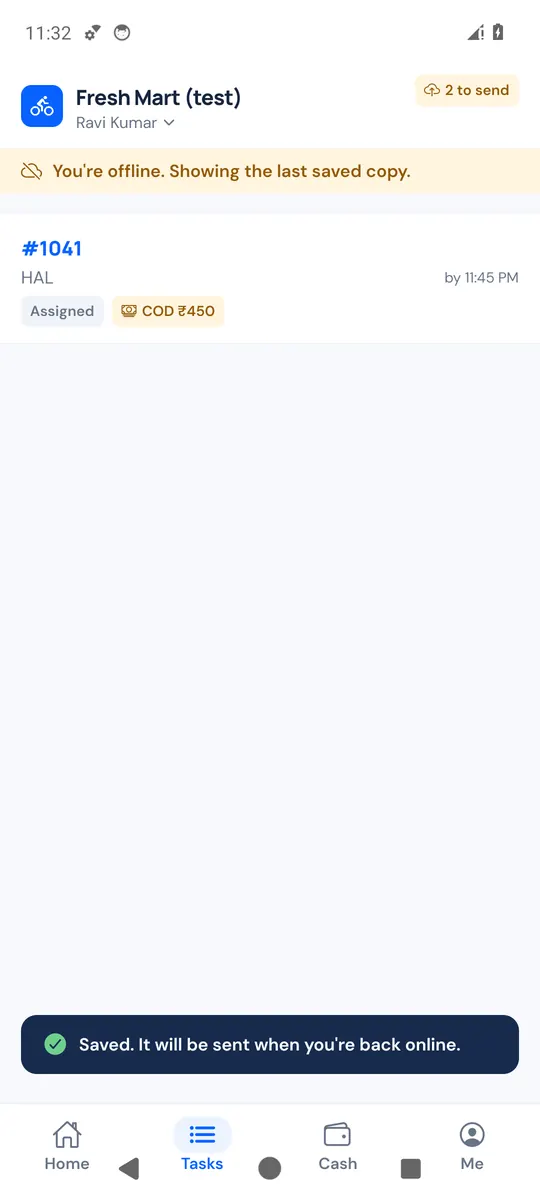
What works without signal
- The app shows the last saved copy of your tasks, offers and cash ("You're offline. Showing the last saved copy.").
- Status updates (Accept or Reject on a task the store gave you, Picked up, Start delivery, Can't deliver, and deliveries that need no code) are saved on the phone: "Saved. It will be sent when you're back online." The task shows Not sent yet, and the top of the screen shows how many updates are waiting ("2 to send").
- When the signal returns, updates are sent in the order they were made, with the time they really happened. A photo is uploaded before the update that uses it. Sending one twice never records it twice.
The delivery code needs signal
The code can only be checked online. Without signal, the deliver screen says so:
- If your store does not allow delivery without signal: "No internet. The code can only be checked online. Move to a place with signal and try again."
- If your store allows it (Allow delivery without signal in settings): the rider can tap Deliver with a photo instead, take a photo of the delivered parcel and confirm. The app records their location with it. On the board, that delivery shows Needs review for staff to check the photo.
If the store changed the delivery meanwhile
If staff reassigned or cancelled a delivery while the rider was offline, the waiting update is dropped and the app shows "The store changed this delivery. Showing the latest."
Don't sign out with updates waiting
Signing out deletes updates that were not sent yet. The app warns before it does ("… updates are not sent yet and will be lost. Get online first if you can.").
For store owners
The board and the order page show each update when it reaches the server, with the time the rider made it. A rider who was offline may show a delivery late on the board, then catch up all at once.